Work with Etta, your in-app AI assistant
Ask Etta to look things up, build segments and draft campaigns. Every change waits for your approval, and Etta tasks run on a schedule or condition.
Updated October 22, 2026
Etta is the assistant built into EterMail. Ask in plain words, in English or Chinese, and Etta looks things up in your account or does the work for you. Etta acts as you and can only do what your role allows. Every change waits on a card until you approve it.
1. Open Etta
Click Ask Etta at the top right of any page. The panel opens beside your work with a few starter questions you can click.
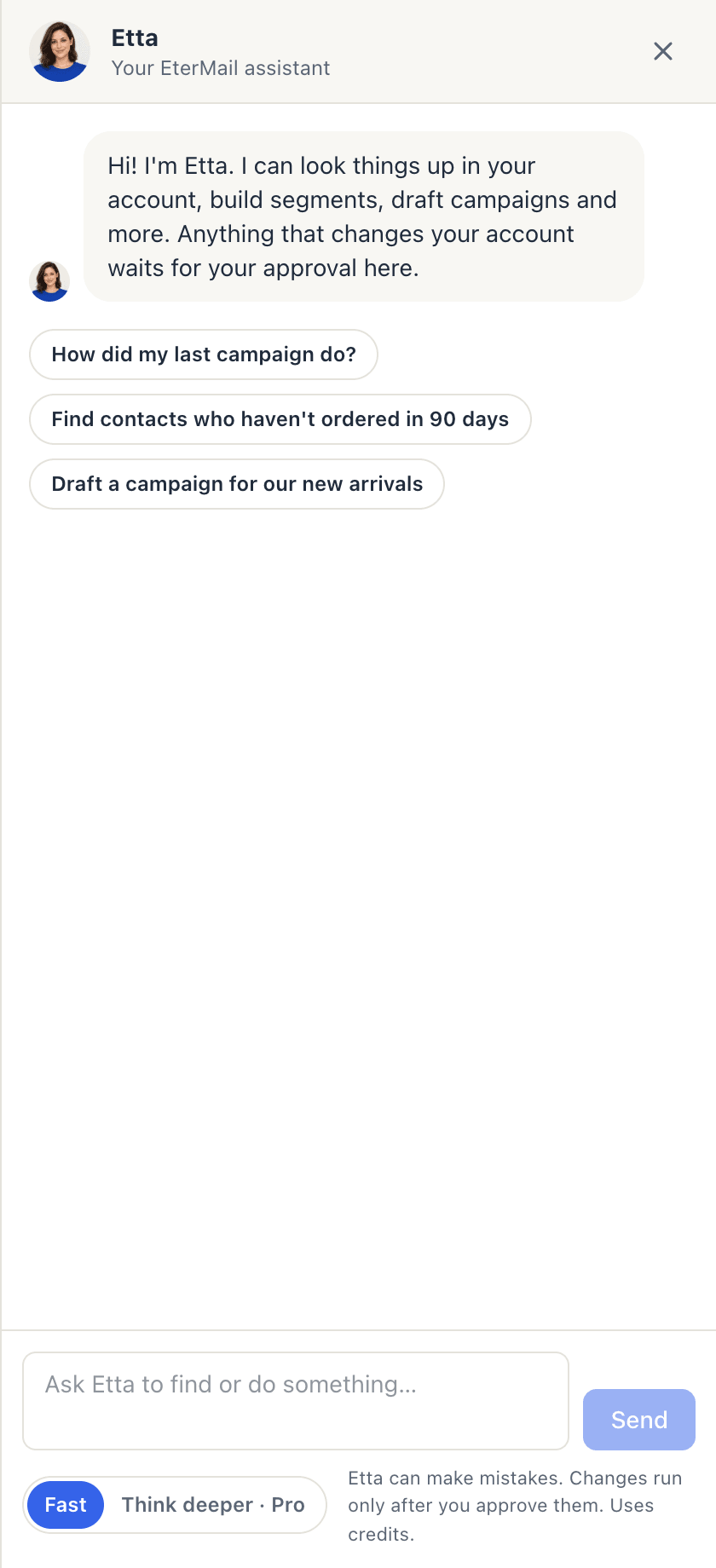
Type your request in the box ("Ask Etta to find or do something…") and press Send. New chat starts a fresh conversation.
2. What Etta can look up
Etta can read most of your account, and reading never needs approval:
- projects, the brand profile and credit balance,
- contacts, segments (with a preview of who matches) and signup forms,
- campaigns, the estimate before a send, and project analytics,
- automations and each flow's report,
- sequences, mailboxes and prospects,
- inbox conversations.
For example: "How did my last campaign do?", "Which flow brought in the most revenue this month?" or "Find contacts who haven't ordered in 90 days".
3. What Etta can do, with your approval
Etta can create and edit segments, draft and rewrite campaigns, send a test email, schedule, pause or cancel a campaign, build signup forms, write sequences and enroll prospects, import contacts or prospects, draft and send inbox replies, and set up Etta tasks.
None of this happens straight away. Etta shows a card that starts with Etta wants to: and says exactly what will happen. Click Approve to run it once, as you, or Reject. Cards you leave alone expire after 24 hours.
A few things are yours to do on the page itself, and Etta will point you there: buying credits or changing plan, API keys, inviting members, connecting cold email mailboxes, setting up a sending domain and connecting Shopify. Creating and approving automations happens on the Automations page too. See flows.
4. Fast or Think deeper
The switch under the message box sets how Etta thinks:
- Fast: quick answers and everyday tasks. It uses the fewest credits.
- Think deeper · Pro: a stronger model for analysis and plans. It's more careful and slower, and uses several times more credits. Changes still need your approval.
5. Set up Etta tasks
Etta tasks let Etta work while you're away. Open Etta tasks in the sidebar, then fill in New task:
- Give the task a Name and describe What Etta should do and how to report back. Etta won't ask questions mid-run. It makes reasonable choices and says which ones.
- Choose When it runs:
- On a schedule: daily, weekly or monthly at a set hour, in your time zone. - When a condition is met: a campaign's click rate is low, the bounce rate is high, a segment reaches a size, or an event happens a number of times. Conditions are checked every hour.
- Set a Monthly spending cap (2,000 credits by default) and tick Email me when it finishes if you want a note.
- Click Create task. You can Run now, Pause, Resume or Delete a task later, and see its Recent runs.
There are ready-made examples to start from: a weekly marketing report, a better draft when clicks are low, and a bounce investigation. Each person can have up to 20 tasks.
When a task runs, Etta reads and analyses right away. Any change it wants to make still becomes an approval card for you.
Pre-approved sending (optional)
If you're an owner or admin, you can let one task send campaigns without a card each time. Under Pre-approved sending (optional), choose who it may send to (Only to a segment, or Everyone subscribed), the most recipients per send and the most sends a month. Tick the confirmation, then click Turn on auto-send.
Within those limits, Etta may send a draft campaign in that project during the task's runs. Anything outside them still needs a card. You get an email for every automatic send. Auto-send switches itself off if bounces or complaints rise in the last 24 hours. Click Stop auto-send to turn it off yourself at any time.
Good to know
- Credits. Etta uses credits by AI usage, at the model's cost × 2. Before each step, Etta sets aside enough credits to cover it and returns what it doesn't use. If you run out, Etta says so. Top up on Plan & Credits. See credits and billing.
- Etta can make mistakes. Check numbers that matter, and read each card before you approve it.
- Prefer working from Claude or ChatGPT? AI apps can use the same actions, and their changes wait for your approval too. See Connect AI apps (MCP).
FAQ
Can Etta send email without asking me?
Only inside an Etta task where an owner or admin has turned on pre-approved sending, and only within its limits. Everything else waits for your approval on a card.
Can my teammates see my Etta chats?
Each member has their own Etta and their own approval cards. Etta sees what you can see, and only you can approve your cards.
How much does a question cost?
It depends on the length of the conversation and the mode. Fast is cheapest, and Think deeper uses several times more. See the exact amounts under Etta assistant on the Usage page.
Why did my task not run?
It may have used up this month's cap, or it may be paused. Raise the cap or click Resume, then Run now.
Looking for something else? All guides →