Create a signup form to collect subscribers
Build a hosted signup form with double opt-in, embed it with a link, an iframe or your own form, and see the consent record each signup leaves.
Updated October 22, 2026
A signup form is how new people subscribe to your marketing email. EterMail hosts the form for you: you get a page you can link to, an iframe you can paste into your site, or an endpoint your own form can post to. Every signup is stored with a consent record, so you can always show when and how someone subscribed.
1. Create the form
Open Signup forms in the sidebar and click New form. The top of the page shows how many marketing subscribers you have in total and where they came from (Shopify, CSV, API, forms and so on).
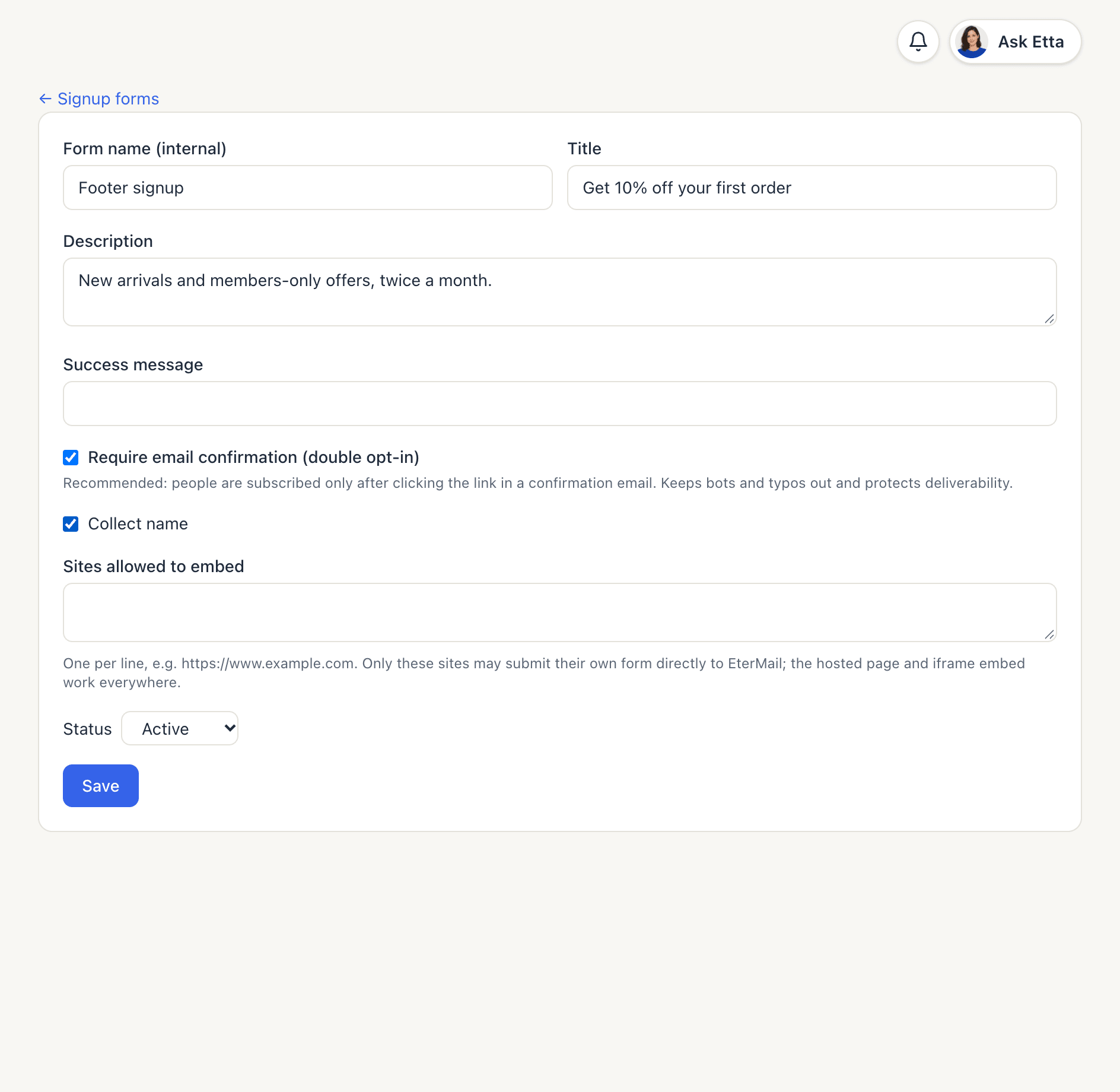
Fill in:
| Field | What it does |
|---|---|
| Form name (internal) | Only you see it, e.g. "Footer signup" |
| Title | The heading people see, e.g. "Get 10% off your first order" |
| Description | A line about what they'll get and how often |
| Success message | What they see once they're subscribed. Leave it empty for a standard thank-you. |
| Collect name | Adds First name and Last name fields. Email is always asked. |
| Status | Active forms accept signups. Disabled forms stop working everywhere. |
2. Keep double opt-in on
Require email confirmation (double opt-in) is on by default, and we recommend leaving it on. With it on:
- The person submits the form and sees "Check your inbox and click the link to confirm your subscription."
- They get an email titled "Please confirm your subscription to" your project name. The link is valid for 48 hours.
- They open the link and click Confirm subscription. Only then are they subscribed.
Until they confirm, the contact shows as Pending. Bots and mistyped addresses never reach your list, which keeps bounces and complaints down.
The confirmation email comes from your own sender once you have a verified sending domain, and from EterMail's address before that.
If you turn double opt-in off, submitting subscribes people immediately, and the editor warns you that bots and typos go straight onto the list.
3. Save and share the form
Click Save. The form page now shows its counts (Submitted, Confirmed, Pending) and three ways to use it.
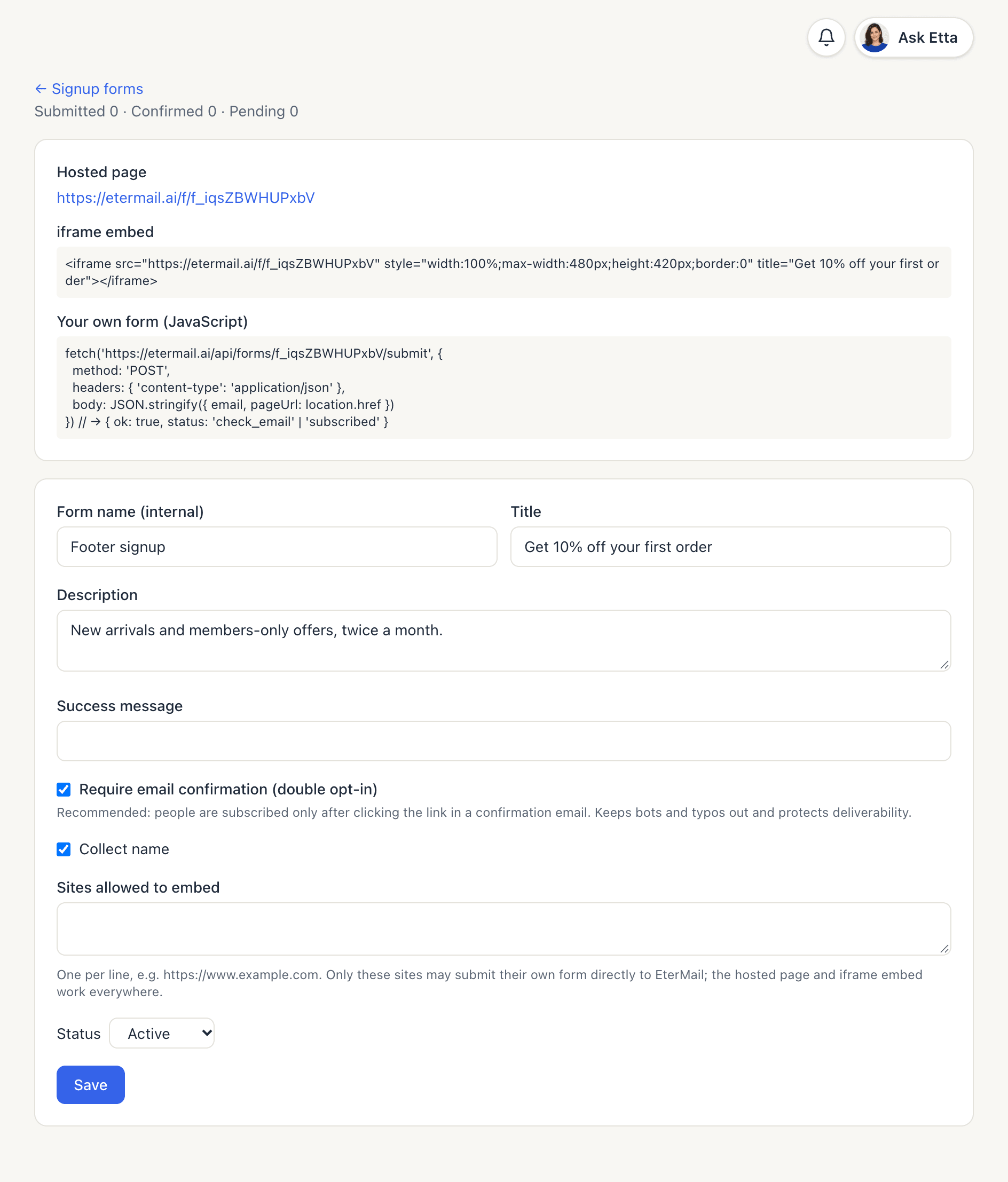
Hosted page. A link like https://etermail.ai/f/f_… that works on its own. Share it in social bios, QR codes, receipts or anywhere else you can put a link.
iframe embed. Paste the snippet into your site's HTML to show the same form inline. It's 100% wide, up to 480px, and 420px tall. Adjust the style if you need to.
Your own form (JavaScript). If you'd rather keep your site's own design, post the email to the form's submit URL as JSON (email, plus firstName and lastName if you collect names, and pageUrl). The response is { ok: true, status: 'check_email' } with double opt-in, or 'subscribed' without it. This only works from sites listed in Sites allowed to embed, one per line, e.g. https://www.example.com. The hosted page and iframe work everywhere.
Here's how the hosted form looks to a visitor:
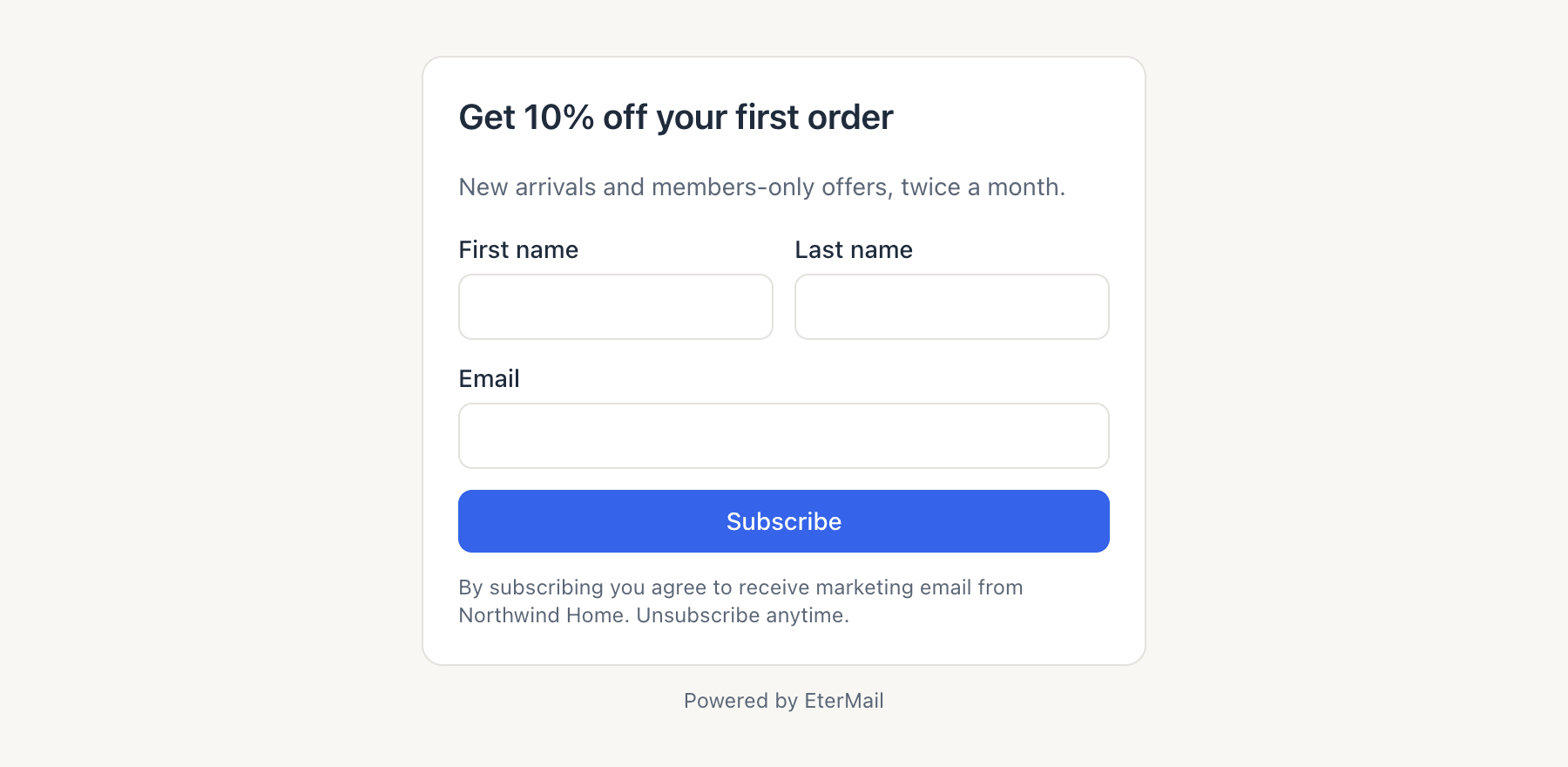
Under the button, the form tells people they're agreeing to receive marketing email from your project and can unsubscribe anytime. The form's text follows your project's content language.
What gets recorded
Each signup saves consent evidence with the contact: which form, the time, the page it was submitted from, the IP address and browser, and whether double opt-in was on. A confirmation adds the time, IP address and browser of the click. On the contact's page, the Timeline shows entries such as Confirmation sent and Confirmed, with Form as the source.
Good to know
- Spam protection. Forms have a hidden field that catches bots, and repeated submissions are limited (per IP address and per email). People who hit the limit see "Too many attempts. Please try again later."
- No list probing. The form gives the same answer whether or not an address is already subscribed.
- People who unsubscribed earlier can subscribe again through a form, because it's their own fresh opt-in. With double opt-in they still have to confirm.
- Disabling a form stops the hosted page, the iframe and the JavaScript endpoint. Existing subscribers aren't affected.
FAQ
Do new subscribers get a welcome email?
Not from the form itself. Set up a welcome series in Automations and it starts when someone subscribes.
Why are some signups still Pending?
They haven't clicked the confirmation link yet. Links expire after 48 hours. After that, the person needs to submit the form again.
Can I style the hosted form?
The hosted page uses a clean standard layout with your title and description. For full control over the design, use your own form with the JavaScript option.
Can Etta or an AI app create forms?
Yes. Etta and connected AI apps can create and update signup forms for you. See Etta and MCP.
Looking for something else? All guides →